LinGauge Widget
The LinGauge is a linear instrument — a bar, a segmented LED block
readout, or a sliding pointer marker over a track — the horizontal/vertical
counterpart to the round Gauge. Init installs a bar style with orientation
auto-detected from the widget's aspect ratio (tall area → vertical),
6×1 ticks and damped motion; set_area() places it, set_range() maps
the units. set_style() switches between BAR / SEGMENTS / POINTER — the
same value, three presentations; set_pointer_image() centres any flash
icon on the value position for the POINTER style. add_zone() paints
coloured bands with an optional set_zone_tint() so the fill itself
recolours by zone, plus the same edge-triggered on_zone alarm hook the
round Gauge has.
Every example below is complete — the file-scope storage, the callbacks and
the build calls — beside the exact frame it renders on a 480×320 panel. Each
compiles against nothing but the released library: drop it into the
Application Skeleton and it runs as-is. The icons come from
inc/icons/, the lexend fonts from inc/fonts/ — both ship with the library.
Examples
Default LinGauge (live feed)
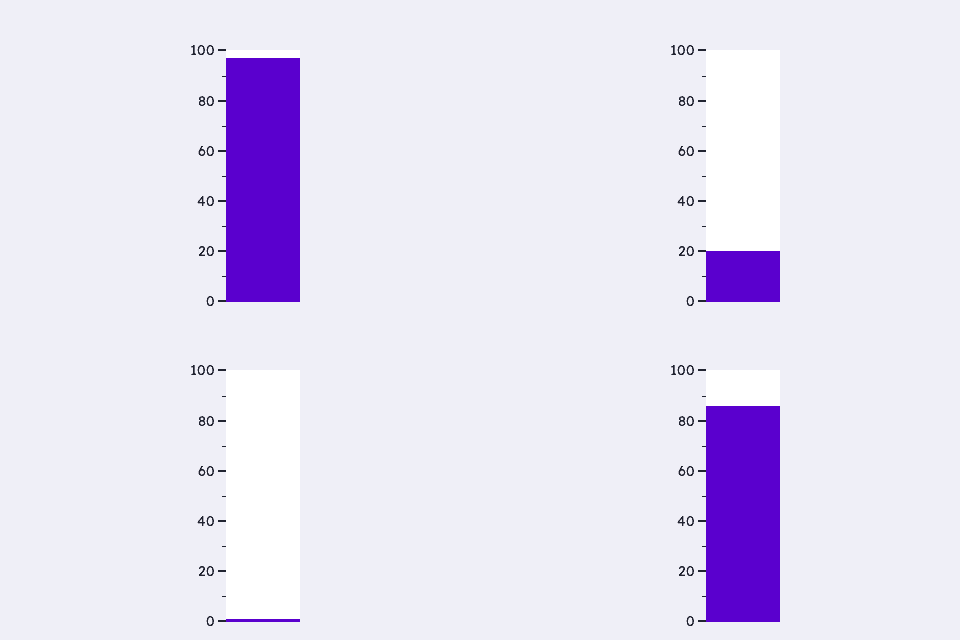
Three calls make a working instrument: ugui_widget_lingauge_init() installs the whole look, set_area() places it — a tall rect makes it vertical — and set_range() maps the units. Numerals are the one extra (optional) call so the scale reads. Only the span the fill edge travels through repaints; the scale never does.
/* --- widget IDs: only need to be unique within the screen (10+ leaves
 *     room for the IDs your app already uses, e.g. the root's) --- */
enum {
    WDGT_ID_DEMO = 10
};

/* --- fonts: each is DEFINED in inc/fonts/<name>.h — #include that
 *     header in exactly one .c of your app; elsewhere just: --- */
extern const ugui_font_t lexend_14pt_2bpp;

/* --- file-scope storage --- */
#if defined(UGUI_WIDGET_ENABLE_LINGAUGE)
static ugui_screen_t  s_screen;
static ugui_widget_t   s_root;
static ugui_widget_t       s_bar;
static ugui_lingauge_ext_t s_bar_ext;
#define BAR_W   120
#define BAR_H   (UGUI_SCREEN_H - 38 - 10)
#define BAR_X   ((UGUI_SCREEN_W - BAR_W) / 2)
#define BAR_Y   (38 + 2)
#endif

/* --- build it (in your screen's init) --- */
ugui_widget_lingauge_init(&s_root, &s_bar, &s_bar_ext);
ugui_widget_set_area(&s_bar, BAR_X, BAR_Y, BAR_W, BAR_H);
ugui_widget_lingauge_set_range(&s_bar, 0, 100);
ugui_widget_set_id(&s_bar, WDGT_ID_DEMO);
#ifdef UGUI_ENABLE_FONT
ugui_widget_lingauge_set_numerals(&s_bar, &lexend_14pt_2bpp);
#endif
ugui_screen_add_widget(&s_screen, &s_bar);
Bar / Segments / Pointer
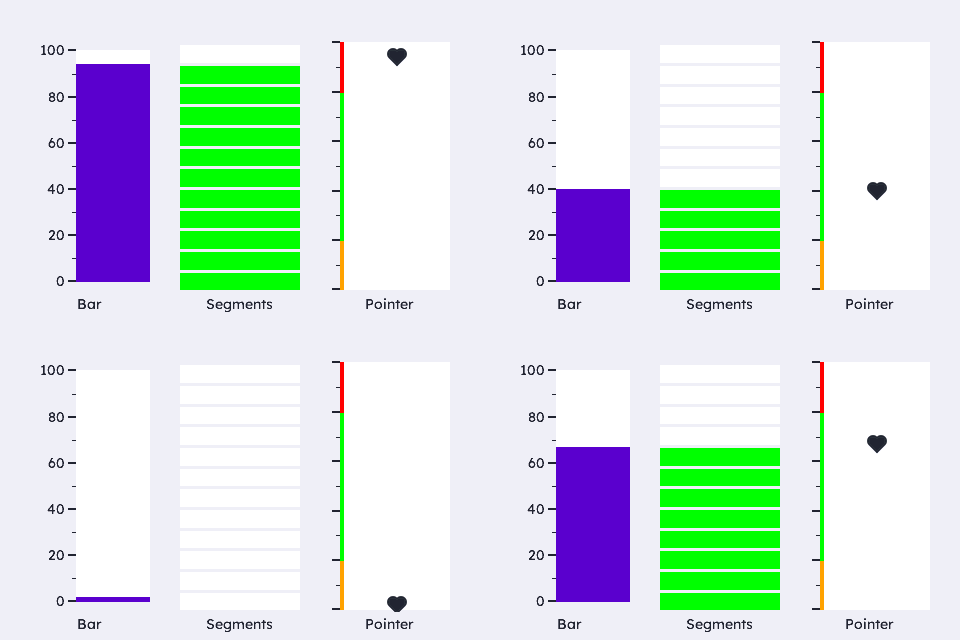
The three display styles, one value: BAR is a continuous fill with numerals (fuel/temp presentation); SEGMENTS is 12 LED blocks with no scale (battery/VU presentation); POINTER is an image marker (a heart icon) sliding over an empty track with green/amber/red zones — set_pointer_image() centres any flash icon on the value position.
/* --- widget IDs: only need to be unique within the screen (10+ leaves
 *     room for the IDs your app already uses, e.g. the root's) --- */
enum {
    WDGT_ID_BAR = 10, WDGT_ID_SEGMENTS, WDGT_ID_POINTER
};

/* --- image assets (inc/icons/ + inc/images/, shipped with the library;
 *     each header DEFINES its image — include it in ONE .c only) --- */
#ifdef UGUI_WIDGET_ENABLE_IMAGE
#include "icons/heart_icon_1_fill_grayscale_4.h"   /* defines img_heart_icon_1_fill */
#endif

/* --- fonts: each is DEFINED in inc/fonts/<name>.h — #include that
 *     header in exactly one .c of your app; elsewhere just: --- */
extern const ugui_font_t lexend_14pt_2bpp;

/* --- file-scope storage --- */
#if defined(UGUI_WIDGET_ENABLE_LINGAUGE)
static ugui_screen_t  s_screen;
static ugui_widget_t   s_root;
static ugui_widget_t       s_bar,     s_seg,     s_ptr;
static ugui_lingauge_ext_t s_bar_ext, s_seg_ext, s_ptr_ext;
#define COL_W    120
#define GAP      ((UGUI_SCREEN_W - 3 * COL_W) / 4)
#define COL_Y    (38 + 2)
#define CAP_H    20
#define COL_H    (UGUI_SCREEN_H - COL_Y - CAP_H - 8)
#define COL_X(i) (GAP + (i) * (COL_W + GAP))
#endif

/* --- build it (in your screen's init) --- */
/* BAR with numerals. */
ugui_widget_lingauge_init(&s_root, &s_bar, &s_bar_ext);
ugui_widget_set_area(&s_bar, COL_X(0), COL_Y, COL_W, COL_H);
ugui_widget_set_id(&s_bar, WDGT_ID_BAR);
ugui_widget_lingauge_set_range(&s_bar, 0, 100);
#ifdef UGUI_ENABLE_FONT
ugui_widget_lingauge_set_numerals(&s_bar, &lexend_14pt_2bpp);
#endif
ugui_screen_add_widget(&s_screen, &s_bar);

/* SEGMENTS: 12 LED blocks, no scale — clean full-width blocks. */
ugui_widget_lingauge_init(&s_root, &s_seg, &s_seg_ext);
ugui_widget_set_area(&s_seg, COL_X(1), COL_Y, COL_W, COL_H);
ugui_widget_set_id(&s_seg, WDGT_ID_SEGMENTS);
ugui_widget_lingauge_set_range(&s_seg, 0, 100);
ugui_widget_lingauge_set_style(&s_seg, UGUI_LINGAUGE_STYLE_SEGMENTS, 12u, 3u);
ugui_widget_lingauge_set_ticks(&s_seg, 0u, 0u, 1u, 1u);   /* scale off */
ugui_widget_set_color(&s_seg, UGUI_COLOR_GREEN);
ugui_screen_add_widget(&s_screen, &s_seg);

/* POINTER over zones: the marker indicates, the zones classify. */
ugui_widget_lingauge_init(&s_root, &s_ptr, &s_ptr_ext);
ugui_widget_set_area(&s_ptr, COL_X(2), COL_Y, COL_W, COL_H);
ugui_widget_set_id(&s_ptr, WDGT_ID_POINTER);
ugui_widget_lingauge_set_range(&s_ptr, 0, 100);
ugui_widget_lingauge_set_style(&s_ptr, UGUI_LINGAUGE_STYLE_POINTER, 0u, 0u);
ugui_widget_lingauge_set_track(&s_ptr, 0u, 5u);
(void)ugui_widget_lingauge_add_zone(&s_ptr,  0,  20, UGUI_COLOR_AMBER);
(void)ugui_widget_lingauge_add_zone(&s_ptr, 20,  80, UGUI_COLOR_GREEN);
(void)ugui_widget_lingauge_add_zone(&s_ptr, 80, 100, UGUI_COLOR_RED);
/* Marker colour must contrast the track in BOTH themes: the track is
 * UGUI_THEME_SURFACE (white in light mode), so a hardcoded white marker
 * disappears there — use the theme text role instead. */
ugui_widget_set_color(&s_ptr, UGUI_THEME_TEXT);
#ifdef UGUI_WIDGET_ENABLE_IMAGE
/* Image marker: the heart icon slides along the track, tinted with
 * w->color (theme text) — swap the icon or colour freely. */
ugui_widget_lingauge_set_pointer_image(&s_ptr, &img_heart_icon_1_fill);
#endif
ugui_screen_add_widget(&s_screen, &s_ptr);
Automotive Strip (fuel / coolant / battery)
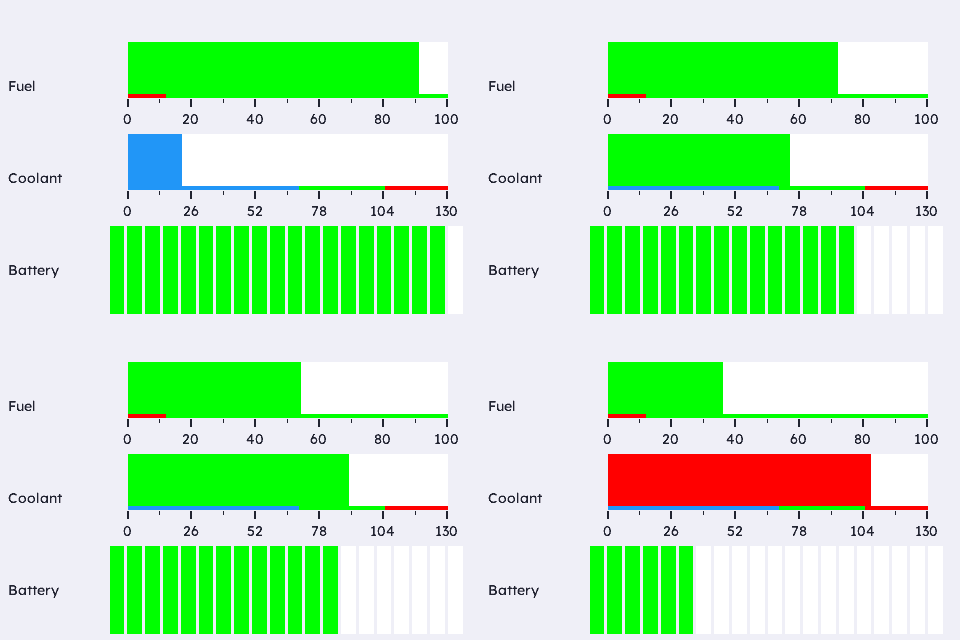
Three horizontal gauges the way a cluster uses them: FUEL has a red low-fuel zone with set_zone_tint() (the bar itself turns red as the tank runs low) and an on_zone hook where a telltale would light; COOLANT has cold/normal/hot zones + tint; SoC is a 20-segment battery bar with no scale. All three play a looping piecewise-linear signal.
/* --- widget IDs: only need to be unique within the screen (10+ leaves
 *     room for the IDs your app already uses, e.g. the root's) --- */
enum {
    WDGT_ID_FUEL = 10, WDGT_ID_COOLANT, WDGT_ID_BATTERY
};

/* --- fonts: each is DEFINED in inc/fonts/<name>.h — #include that
 *     header in exactly one .c of your app; elsewhere just: --- */
extern const ugui_font_t lexend_14pt_2bpp;

/* --- file-scope storage --- */
#if defined(UGUI_WIDGET_ENABLE_LINGAUGE)
static ugui_screen_t  s_screen;
static ugui_widget_t   s_root;
static ugui_widget_t       s_fuel,     s_temp,     s_soc;
static ugui_lingauge_ext_t s_fuel_ext, s_temp_ext, s_soc_ext;
#define CAP_W    90
#define ROW_X    (CAP_W + 18)
#define ROW_W    (UGUI_SCREEN_W - ROW_X - 12)
#define ROW_H    ((UGUI_SCREEN_H - 38 - 16) / 3)
#define ROW_Y(i) (38 + 4 + (i) * (ROW_H + 4))
#endif

/* --- local helpers & event callbacks --- */
static void on_fuel_zone(ugui_widget_t* w, int8_t zone, void* ctx)
{
    (void)w; (void)ctx;
    printf("[lingauge.auto] fuel zone -> %s\n",
           (zone == 0) ? "LOW (telltale on)" : "ok");
}

/* --- build it (in your screen's init) --- */
/* FUEL 0-100 %: low-fuel zone + tint (bar turns red when low). */
ugui_widget_lingauge_init(&s_root, &s_fuel, &s_fuel_ext);
ugui_widget_set_area(&s_fuel, ROW_X, ROW_Y(0), ROW_W, (int16_t)ROW_H);
ugui_widget_set_id(&s_fuel, WDGT_ID_FUEL);
ugui_widget_lingauge_set_range(&s_fuel, 0, 100);
(void)ugui_widget_lingauge_add_zone(&s_fuel,  0,  12, UGUI_COLOR_RED);
(void)ugui_widget_lingauge_add_zone(&s_fuel, 12, 100, UGUI_COLOR_GREEN);
ugui_widget_lingauge_set_zone_tint(&s_fuel, true);
ugui_widget_lingauge_set_on_zone(&s_fuel, on_fuel_zone, NULL);
#ifdef UGUI_ENABLE_FONT
ugui_widget_lingauge_set_numerals(&s_fuel, &lexend_14pt_2bpp);
#endif
ugui_screen_add_widget(&s_screen, &s_fuel);

/* COOLANT 0-130 °C: cold / normal / hot zones + tint. */
ugui_widget_lingauge_init(&s_root, &s_temp, &s_temp_ext);
ugui_widget_set_area(&s_temp, ROW_X, ROW_Y(1), ROW_W, (int16_t)ROW_H);
ugui_widget_set_id(&s_temp, WDGT_ID_COOLANT);
ugui_widget_lingauge_set_range(&s_temp, 0, 130);
(void)ugui_widget_lingauge_add_zone(&s_temp,   0,  70, ugui_color_hex(0x2196F3u));
(void)ugui_widget_lingauge_add_zone(&s_temp,  70, 105, UGUI_COLOR_GREEN);
(void)ugui_widget_lingauge_add_zone(&s_temp, 105, 130, UGUI_COLOR_RED);
ugui_widget_lingauge_set_zone_tint(&s_temp, true);
#ifdef UGUI_ENABLE_FONT
ugui_widget_lingauge_set_numerals(&s_temp, &lexend_14pt_2bpp);
#endif
ugui_screen_add_widget(&s_screen, &s_temp);

/* BATTERY SoC: 20 green segments, no scale. */
ugui_widget_lingauge_init(&s_root, &s_soc, &s_soc_ext);
ugui_widget_set_area(&s_soc, ROW_X, ROW_Y(2), ROW_W, (int16_t)ROW_H);
ugui_widget_set_id(&s_soc, WDGT_ID_BATTERY);
ugui_widget_lingauge_set_range(&s_soc, 0, 100);
ugui_widget_lingauge_set_style(&s_soc, UGUI_LINGAUGE_STYLE_SEGMENTS, 20u, 3u);
ugui_widget_lingauge_set_ticks(&s_soc, 0u, 0u, 1u, 1u);   /* scale off */
ugui_widget_set_color(&s_soc, UGUI_COLOR_GREEN);
ugui_screen_add_widget(&s_screen, &s_soc);
From this widget to a working app
Everything above is the widget-specific code. The scaffolding it drops into — storage, HAL, main loop, display-mode bring-up — is the same for every app: copy it from the Application Skeleton.