Gauge Widget
The Gauge is a classic needle dial — automotive speedometer, medical
pressure gauge, any instrument reading. Init installs a 270° sweep, ticks,
a damped AA needle and hub; set_area() places it, set_range() maps the
application units. set_zone() paints coloured bands and fires an
edge-triggered on_zone callback the moment the value crosses into a new
one — the integration point for an alarm manager. set_dynamics() switches
between an instant, no-lag needle (clinical displays) and slew + first-order
damping (a mechanical instrument's glide); set_needle() restyles the
needle itself, and two gauges side by side are just two parameter sets on
the same widget.
Every example below is complete — the file-scope storage, the callbacks and
the build calls — beside the exact frame it renders on a 480×320 panel. Each
compiles against nothing but the released library: drop it into the
Application Skeleton and it runs as-is. The icons come from
inc/icons/, the lexend fonts from inc/fonts/ — both ship with the library.
Examples
Default Gauge (live feed)
Three calls make a presentable instrument: ugui_widget_gauge_init() installs the whole look (270° sweep, 9×4 ticks, red AA needle, hub, damped motion), set_area() places it, set_range() maps the units. The dial face never repaints while the needle moves — the tick hook invalidates only the needle strip.
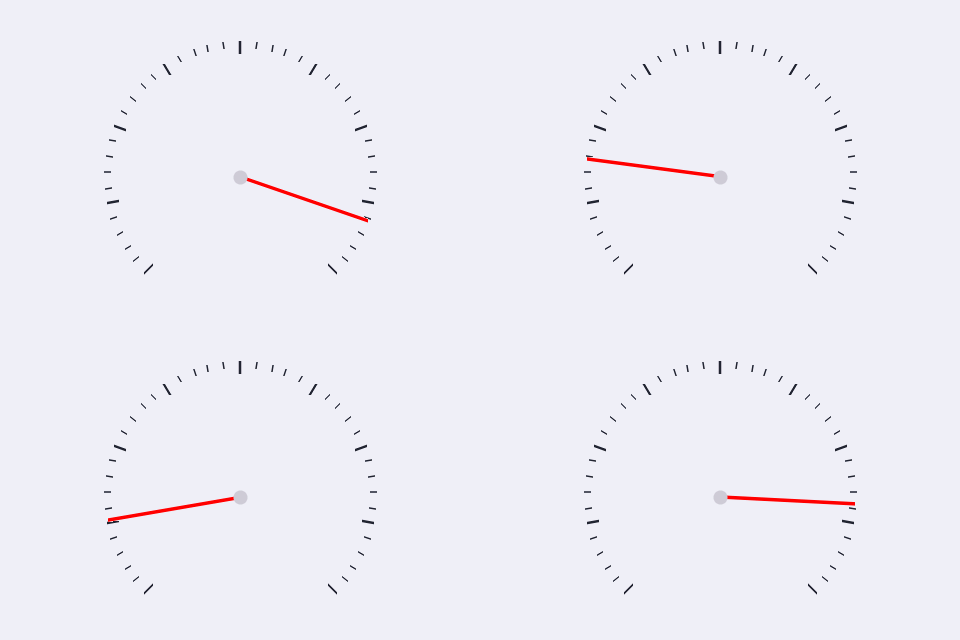
/* --- widget IDs: only need to be unique within the screen (10+ leaves
 *     room for the IDs your app already uses, e.g. the root's) --- */
enum {
    WDGT_ID_DEMO = 10
};

/* --- file-scope storage --- */
#if defined(UGUI_WIDGET_ENABLE_GAUGE)
static ugui_screen_t  s_screen;
static ugui_widget_t   s_root;
static ugui_widget_t    s_gauge;
static ugui_gauge_ext_t s_gauge_ext;
#define DIAL_S  (UGUI_SCREEN_H - 38 - 8)
#define DIAL_X  ((UGUI_SCREEN_W - DIAL_S) / 2)
#define DIAL_Y  (38 + 2)
#endif

/* --- build it (in your screen's init) --- */
ugui_widget_gauge_init(&s_root, &s_gauge, &s_gauge_ext);
ugui_widget_set_area(&s_gauge, DIAL_X, DIAL_Y, DIAL_S, DIAL_S);
ugui_widget_gauge_set_range(&s_gauge, 0, 100);
ugui_widget_set_id(&s_gauge, WDGT_ID_DEMO);
ugui_screen_add_widget(&s_screen, &s_gauge);
Automotive Speedometer (live feed)
A 0-240 km/h dial with scale numerals at the major ticks, a red zone from 200 (add_zone()), and two in-widget labels — the digital speed + "km/h" unit — the add_label() slots, not child widgets. The digital readout follows get_shown(), the DAMPED needle value, so the number and needle always agree.
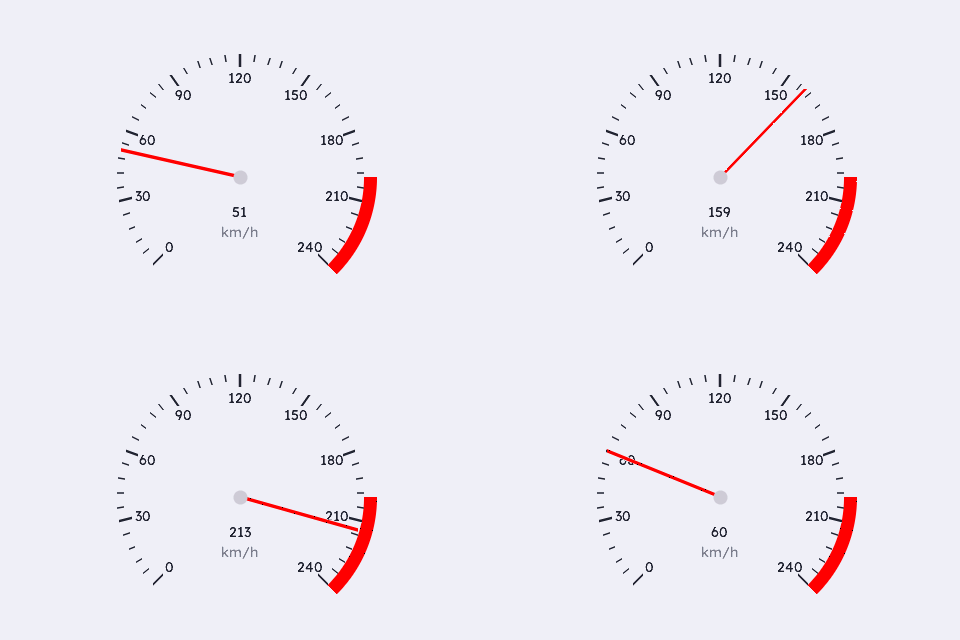
/* --- widget IDs: only need to be unique within the screen (10+ leaves
 *     room for the IDs your app already uses, e.g. the root's) --- */
enum {
    WDGT_ID_DEMO = 10
};

/* --- fonts: each is DEFINED in inc/fonts/<name>.h — #include that
 *     header in exactly one .c of your app; elsewhere just: --- */
extern const ugui_font_t lexend_14pt_2bpp;

/* --- file-scope storage --- */
#if defined(UGUI_WIDGET_ENABLE_GAUGE)
static ugui_screen_t  s_screen;
static ugui_widget_t   s_root;
static ugui_widget_t    s_gauge;
static ugui_gauge_ext_t s_gauge_ext;
#endif
#if defined(UGUI_WIDGET_ENABLE_GAUGE)
static ugui_text_cfg_t  s_val_text;
static ugui_text_cfg_t  s_unit_text;
static char             s_val_str[8];
#endif
#if defined(UGUI_WIDGET_ENABLE_GAUGE)
#define DIAL_S  (UGUI_SCREEN_H - 38 - 8)
#define DIAL_X  ((UGUI_SCREEN_W - DIAL_S) / 2)
#define DIAL_Y  (38 + 2)
#define VAL_X   ((DIAL_S / 2) - 35)
#define VAL_Y   ((DIAL_S / 2) + 26)
#define VAL_W   70
#define VAL_H   18
#define UNIT_Y  (VAL_Y + VAL_H + 2)
#endif

/* --- build it (in your screen's init) --- */
ugui_widget_gauge_init(&s_root, &s_gauge, &s_gauge_ext);
ugui_widget_set_area(&s_gauge, DIAL_X, DIAL_Y, DIAL_S, DIAL_S);
ugui_widget_set_id(&s_gauge, WDGT_ID_DEMO);
ugui_widget_gauge_set_range(&s_gauge, 0, 240);
(void)ugui_widget_gauge_add_zone(&s_gauge, 200, 240, UGUI_COLOR_RED);
#ifdef UGUI_ENABLE_FONT
ugui_widget_gauge_set_numerals(&s_gauge, &lexend_14pt_2bpp);

s_val_str[0] = '0'; s_val_str[1] = '\0';
ugui_text_cfg_init(&s_val_text, s_val_str, &lexend_14pt_2bpp, UGUI_THEME_TEXT,
                   UGUI_ALIGN_CENTER, (ugui_point_t){ 0, 0 }, 0u);
s_val_text.area = (ugui_rect_t){ VAL_X, VAL_Y, VAL_W, VAL_H };
(void)ugui_widget_gauge_add_label(&s_gauge, &s_val_text);

ugui_text_cfg_init(&s_unit_text, "km/h", &lexend_14pt_2bpp,
                   ugui_color_blend(UGUI_THEME_TEXT, UGUI_THEME_BG, 140u),
                   UGUI_ALIGN_CENTER, (ugui_point_t){ 0, 0 }, 0u);
s_unit_text.area = (ugui_rect_t){ VAL_X, UNIT_Y, VAL_W, VAL_H };
(void)ugui_widget_gauge_add_label(&s_gauge, &s_unit_text);
#endif
ugui_screen_add_widget(&s_screen, &s_gauge);
Medical Pressure Dial (zone alarm)
An airway-pressure gauge (0-60 cmH2O, 240° sweep) with three clinical bands — amber LOW, green NORMAL, red HIGH — classified every set_value() and reported through the edge-triggered on_zone callback, which this screen turns into a status banner. Dynamics are off (slew 0 / damping 0): a clinical display shows the value as measured, no cosmetic lag.
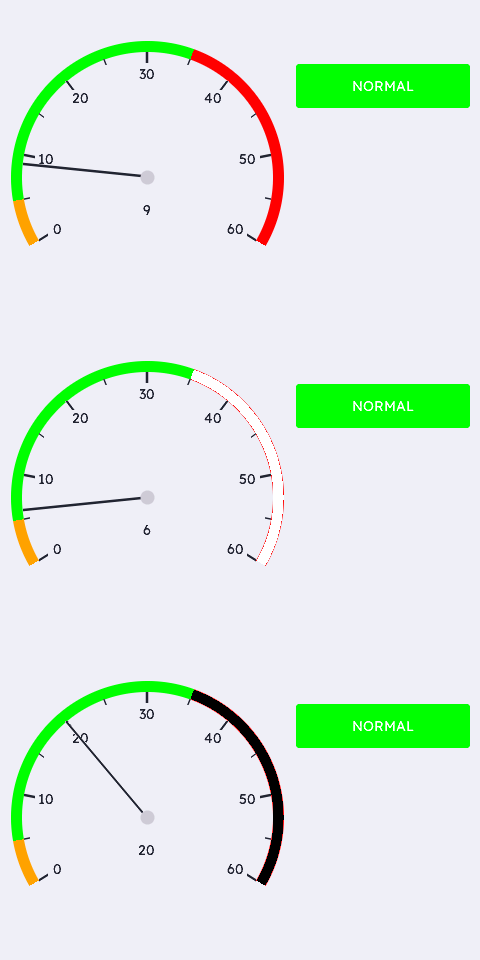
/* --- widget IDs: only need to be unique within the screen (10+ leaves
 *     room for the IDs your app already uses, e.g. the root's) --- */
enum {
    WDGT_ID_DEMO = 10
};

/* --- fonts: each is DEFINED in inc/fonts/<name>.h — #include that
 *     header in exactly one .c of your app; elsewhere just: --- */
extern const ugui_font_t lexend_14pt_2bpp;

/* --- file-scope storage --- */
#if defined(UGUI_WIDGET_ENABLE_GAUGE)
static ugui_screen_t  s_screen;
static ugui_widget_t   s_root;
static ugui_widget_t    s_gauge;
static ugui_gauge_ext_t s_gauge_ext;
static ugui_widget_t    s_banner;              /* zone status (alarm hook)    */
static ugui_box_ext_t   s_banner_ext;
#endif
#if defined(UGUI_WIDGET_ENABLE_GAUGE)
static ugui_text_cfg_t  s_banner_text;
static ugui_text_cfg_t  s_val_text;
static char             s_val_str[8];
#endif
#if defined(UGUI_WIDGET_ENABLE_GAUGE)
#define DIAL_S   (UGUI_SCREEN_H - 38 - 8)
#define DIAL_X   10
#define DIAL_Y   (38 + 2)
#define BAN_X    (DIAL_X + DIAL_S + 12)
#define BAN_Y    (DIAL_Y + 24)
#define BAN_W    (UGUI_SCREEN_W - BAN_X - 10)
#define BAN_H    44
#define VAL_X    ((DIAL_S / 2) - 35)
#define VAL_Y    ((DIAL_S / 2) + 24)
#define VAL_W    70
#define VAL_H    18
#endif

/* --- local helpers & event callbacks --- */
static void on_zone(ugui_widget_t* w, int8_t zone, void* ctx)
{
    static const char* const k_txt[] = { "LOW", "NORMAL", "HIGH" };
    ugui_color_t fill;
    (void)w; (void)ctx;

    fill = (zone == 2) ? UGUI_COLOR_RED
         : (zone == 0) ? UGUI_COLOR_AMBER
         : (zone == 1) ? UGUI_COLOR_GREEN
                       : UGUI_THEME_SURFACE;   /* -1: outside all zones */
    ugui_widget_box_set_style(&s_banner, true, 4u, 0u, fill, fill);
#ifdef UGUI_ENABLE_FONT
    s_banner_text.str = (zone >= 0) ? k_txt[zone] : "--";
#endif
    ugui_widget_invalidate(&s_banner);
    printf("[gauge.medical] zone -> %d\n", (int)zone);
}

/* --- build it (in your screen's init) --- */
ugui_widget_gauge_init(&s_root, &s_gauge, &s_gauge_ext);
ugui_widget_set_area(&s_gauge, DIAL_X, DIAL_Y, DIAL_S, DIAL_S);
ugui_widget_set_id(&s_gauge, WDGT_ID_DEMO);
ugui_widget_gauge_set_range(&s_gauge, 0, 60);
ugui_widget_gauge_set_angles(&s_gauge, -1200, 1200);
ugui_widget_gauge_set_needle(&s_gauge, 0u, 2u, 0u, UGUI_THEME_TEXT); /* theme-
                                          aware: dark on light, white on dark */
ugui_widget_gauge_set_dynamics(&s_gauge, 0u, 0u);
(void)ugui_widget_gauge_add_zone(&s_gauge,  0,  5, UGUI_COLOR_AMBER);
(void)ugui_widget_gauge_add_zone(&s_gauge,  5, 35, UGUI_COLOR_GREEN);
(void)ugui_widget_gauge_add_zone(&s_gauge, 35, 60, UGUI_COLOR_RED);
ugui_widget_gauge_set_on_zone(&s_gauge, on_zone, NULL);
#ifdef UGUI_ENABLE_FONT
ugui_widget_gauge_set_numerals(&s_gauge, &lexend_14pt_2bpp);
ugui_widget_gauge_set_ticks(&s_gauge, 7u, 1u, 10u, 5u);   /* 0,10,..,60 */

s_val_str[0] = '5'; s_val_str[1] = '\0';
ugui_text_cfg_init(&s_val_text, s_val_str, &lexend_14pt_2bpp, UGUI_THEME_TEXT,
                   UGUI_ALIGN_CENTER, (ugui_point_t){ 0, 0 }, 0u);
s_val_text.area = (ugui_rect_t){ VAL_X, VAL_Y, VAL_W, VAL_H };
(void)ugui_widget_gauge_add_label(&s_gauge, &s_val_text);
#endif
ugui_screen_add_widget(&s_screen, &s_gauge);

/* Zone status banner — an ordinary box the on_zone callback repaints.
 * enabled=0: display-only, it must not take touch. */
ugui_widget_box_init(&s_root, &s_banner, &s_banner_ext);
ugui_widget_set_area(&s_banner, BAN_X, BAN_Y, BAN_W, BAN_H);
ugui_widget_box_set_style(&s_banner, true, 4u, 0u, UGUI_COLOR_GREEN, UGUI_COLOR_GREEN);
ugui_widget_set_enabled(&s_banner, false);
#ifdef UGUI_ENABLE_FONT
ugui_text_cfg_init(&s_banner_text, "NORMAL", &lexend_14pt_2bpp, UGUI_COLOR_WHITE,
                   UGUI_ALIGN_CENTER, (ugui_point_t){ 0, 0 }, 1u);
ugui_widget_box_set_text(&s_banner, &s_banner_text);
#endif
ugui_screen_add_widget(&s_screen, &s_banner);
Styles + Dynamics
Both dials receive the SAME square-wave target: left "Instant" has dynamics off (the needle snaps, sparse ticks, thin cyan needle); right "Damped" keeps the init defaults — slew + first-order lag plus a counterweight tail — and glides like a mechanical instrument. Side by side the motion model is obvious.
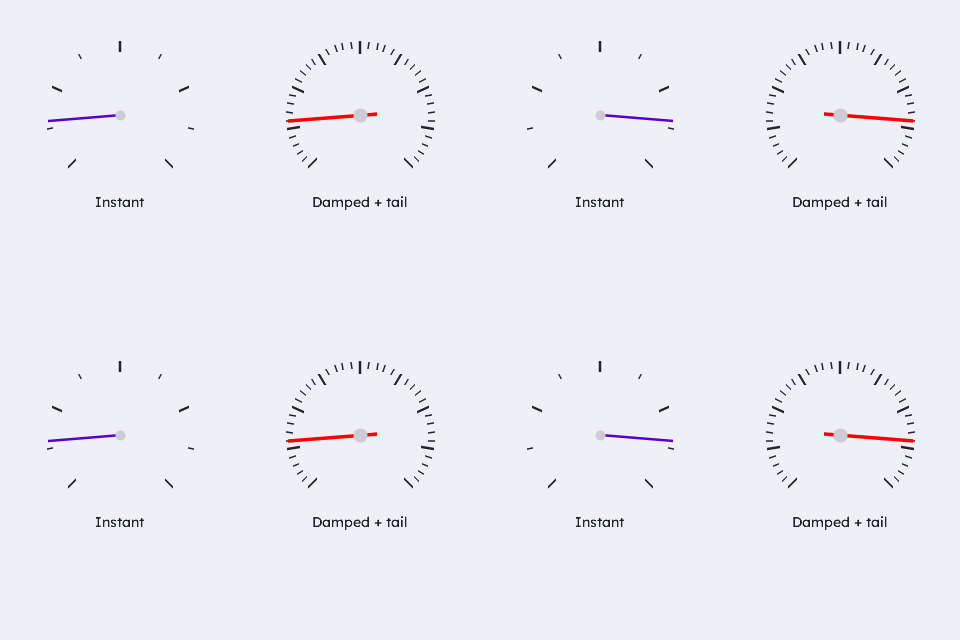
/* --- widget IDs: only need to be unique within the screen (10+ leaves
 *     room for the IDs your app already uses, e.g. the root's) --- */
enum {
    WDGT_ID_INSTANT = 10, WDGT_ID_DAMPED
};

/* --- file-scope storage --- */
#if defined(UGUI_WIDGET_ENABLE_GAUGE)
static ugui_screen_t  s_screen;
static ugui_widget_t   s_root;
static ugui_widget_t    s_instant;
static ugui_gauge_ext_t s_instant_ext;
static ugui_widget_t    s_damped;
static ugui_gauge_ext_t s_damped_ext;
#define DIAL_S   150
#define DIAL_Y   (38 + 2)
#define DIAL_LX  ((UGUI_SCREEN_W / 2 - DIAL_S) / 2)
#define DIAL_RX  (UGUI_SCREEN_W / 2 + DIAL_LX)
#endif

/* --- build it (in your screen's init) --- */
/* Left: instant needle, sparse scale, thin cyan needle. */
ugui_widget_gauge_init(&s_root, &s_instant, &s_instant_ext);
ugui_widget_set_area(&s_instant, DIAL_LX, DIAL_Y, DIAL_S, DIAL_S);
ugui_widget_set_id(&s_instant, WDGT_ID_INSTANT);
ugui_widget_gauge_set_range(&s_instant, 0, 100);
ugui_widget_gauge_set_dynamics(&s_instant, 0u, 0u);        /* snap        */
ugui_widget_gauge_set_ticks(&s_instant, 5u, 1u, 10u, 5u);
ugui_widget_gauge_set_needle(&s_instant, 0u, 2u, 0u, UGUI_THEME_ACCENT); /* theme
                                          accent — readable in light + dark */
ugui_widget_gauge_set_hub(&s_instant, 4u);
ugui_screen_add_widget(&s_screen, &s_instant);

/* Right: default damping + slew, counterweight tail. */
ugui_widget_gauge_init(&s_root, &s_damped, &s_damped_ext);
ugui_widget_set_area(&s_damped, DIAL_RX, DIAL_Y, DIAL_S, DIAL_S);
ugui_widget_set_id(&s_damped, WDGT_ID_DAMPED);
ugui_widget_gauge_set_range(&s_damped, 0, 100);
ugui_widget_gauge_set_needle(&s_damped, 0u, 3u, 16u, UGUI_COLOR_RED);
ugui_screen_add_widget(&s_screen, &s_damped);
From this widget to a working app
Everything above is the widget-specific code. The scaffolding it drops into — storage, HAL, main loop, display-mode bring-up — is the same for every app: copy it from the Application Skeleton.