μGui · EXAMPLES
Real products.
One portable C file each.
Nothing on this page is a mock-up. Every animation is a recording of the μGui C library rendering that example, frame by frame, through the same task loop that runs on hardware. Every example runs on real, off-the-shelf hardware today — and the collection keeps growing: more examples, more boards, more display sizes.
Get them on GitHub See the boards
- Recorded from the real renderer
- Running on real hardware
- Zero hardware code in the UI files
Patient monitor Medical · dark theme
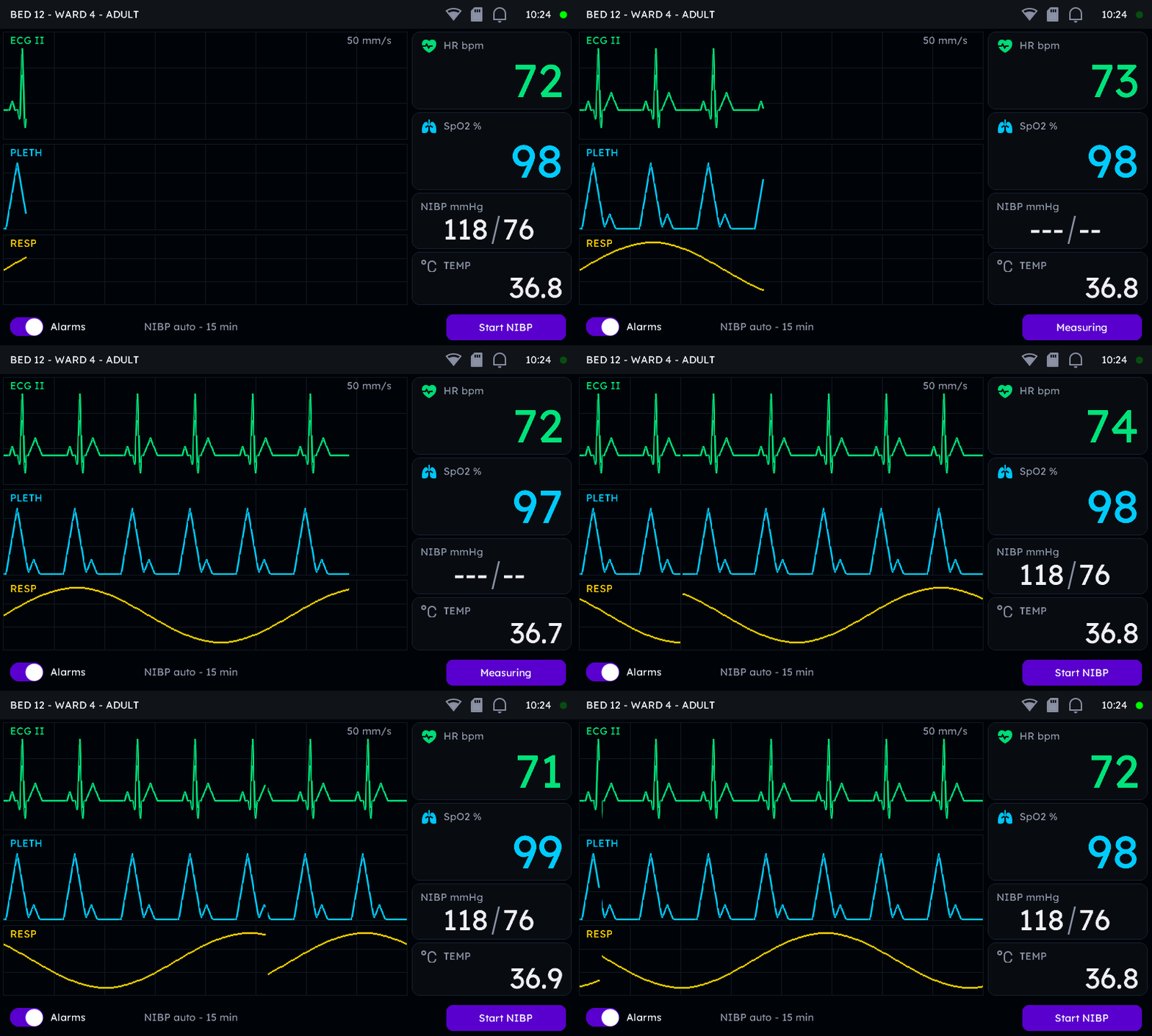
A central-station vitals screen: three phase-locked live waveforms, 64 pt numerals, alarm icons and an NIBP auto-cycle — driven by a simulated 100 Hz ADC clock, exactly like leads on a real patient.
 REAL C RENDER
Three live waveform lanes
ECG, plethysmograph and respiration, each a
ugui_widget_waveform_add_channel_live() channel — no column store,
just a 16-sample input ring (32 bytes) per lane. One simulated ADC clock
feeds all three, so the traces stay phase-locked.
Built-in icons, tinted at runtime
The header wifi/storage/bell and the per-vital heart and lungs marks are the library's own 24 px grayscale icons. Muting alarms swaps the bell and recolours it amber — two calls.
64 pt anti-aliased vitals
Every live value lands through ugui_widget_label_update_text_str() —
the application never touches redraw plumbing; only the dirty numerals repaint.
The clinical details
An LED beat lamp pulses on every R wave, the Start-NIBP button has press animation, and a LINE widget draws the slash in “118/76” — the big numeric faces are digits-only.
The whole app-side contract is three calls:
example_1_patient_monitor_init();                 /* build the screen      */
ugui_screen_switch(&example_1_patient_monitor);   /* show it               */
for (;;) {
    example_1_patient_monitor_task();             /* feed ECG + vitals     */
    ugui_task_execute();                          /* render dirty widgets  */
}Automotive cluster Automotive · dark theme
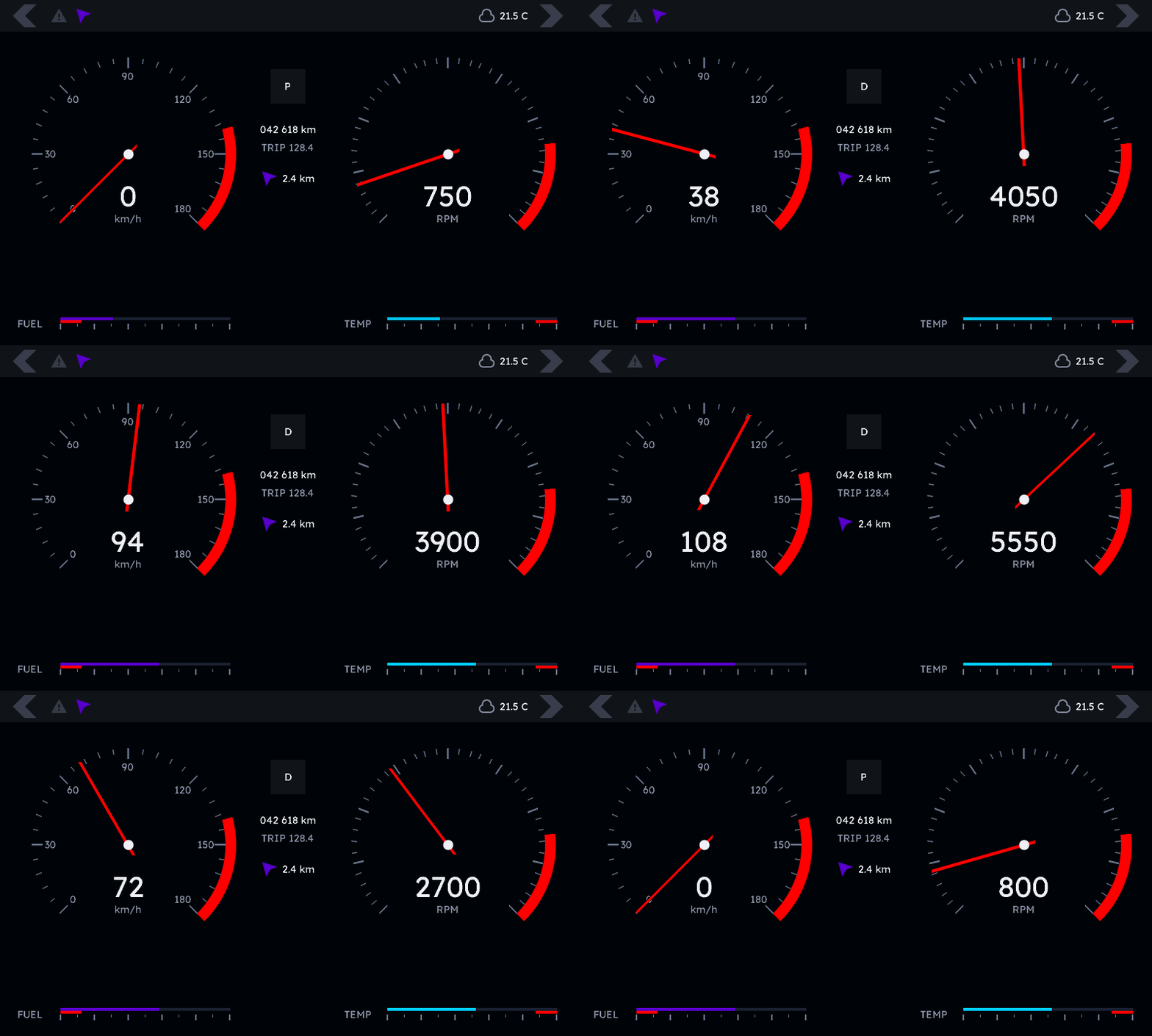
Twin dials with damped needles and redlines, a gear-aware tachometer, icon tell-tales and zoned fuel and coolant gauges — recorded over a scripted 12.8 s drive cycle.
 REAL C RENDER
The gauges do the physics
The app states targets — speed and RPM. The built-in slew and damping dynamics move both needles like they have mass, and per frame only the needle strips repaint.
A gear-aware tachometer
Revs climb through each gear band and drop on the up-shift, derived from the same drive profile with pure integer math.
Readouts that never lie
The digital labels show ugui_widget_gauge_get_shown() — the
damped needle values — so numbers and needles always agree. They sit in
each dial's bottom wedge, the one sector the needle never sweeps.
Tell-tales and zones
Turn-signal arrows and the alert icon are tinted grayscale icons — the alert
flashes amber during the hard brake with one set_color() call. Fuel
carries a low-fuel red zone, coolant an overheat zone.
Coffee machine Consumer · light theme
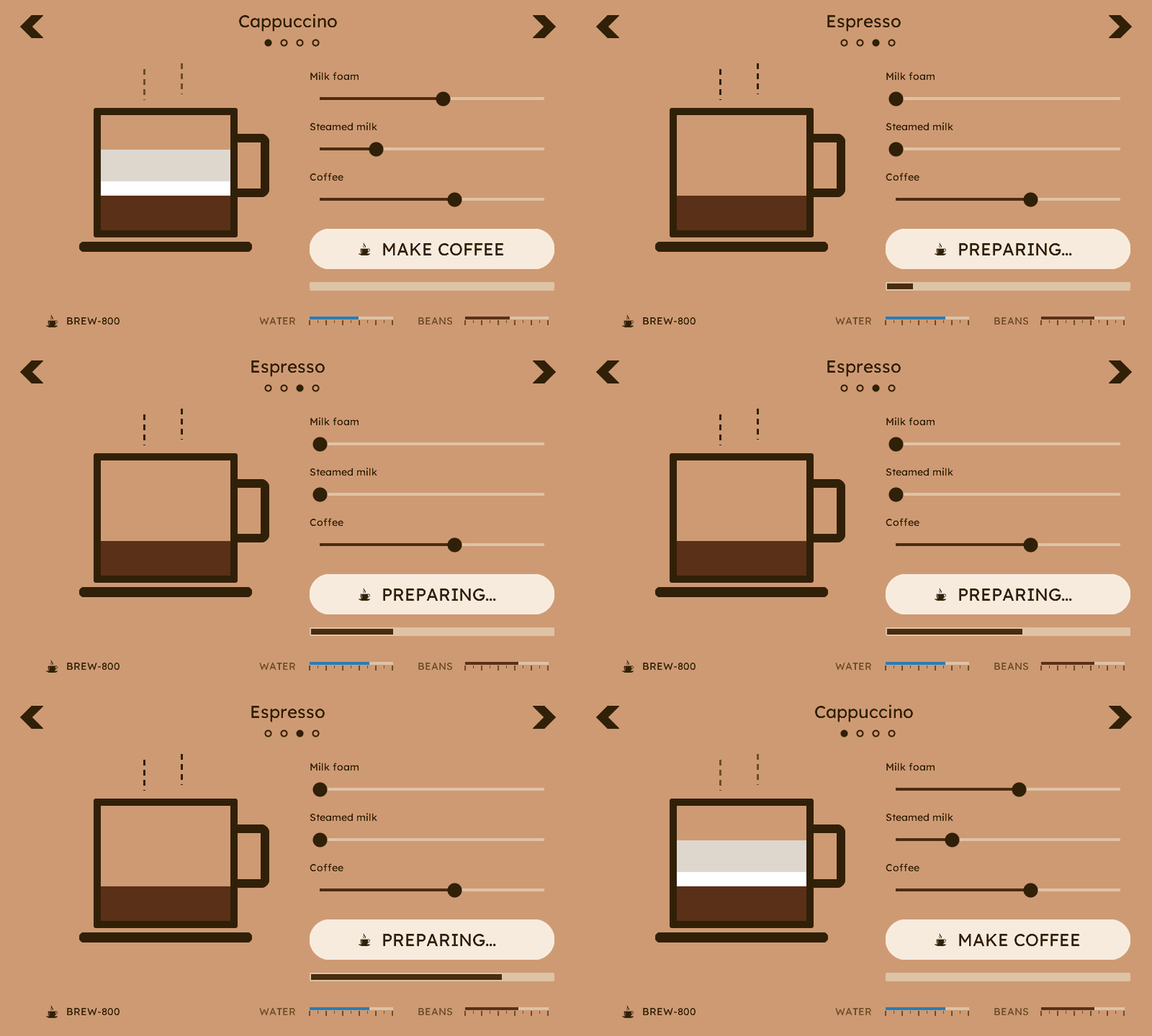
The proof that μGui is not “a dark-theme library”. Same widgets, same zero-heap core — a completely different product: a drink carousel, recipe sliders pouring a live mug, and a brew cycle with progress.
 REAL C RENDER
The drink is the UI
The mug is plain boxes; its foam, milk and coffee layers are driven by three
SLIDER widgets through their on_change callbacks. Drag a slider and
the drink changes — the demo drives the same sliders with
ugui_widget_slider_set_value_animated(). One code path for both.
Carousel with a custom face
Tappable arrow icons, CIRCLE page dots, and a 24 pt title face generated from the same Lexend TTF the library ships at 14 pt, using the font generator.
Your artwork, compiled
The coffee-cup SVG was converted by the image pipeline into a tintable icon used on the button and in the branding.
A warm light theme
Every colour is explicit and per-widget — the medical and automotive screens are dark, this one is daylight. Plus a PROGRESS brew cycle, dashed LINE steam that flickers while brewing, and LINGAUGE water and bean levels.
Smart home panel Smart home · runtime theme
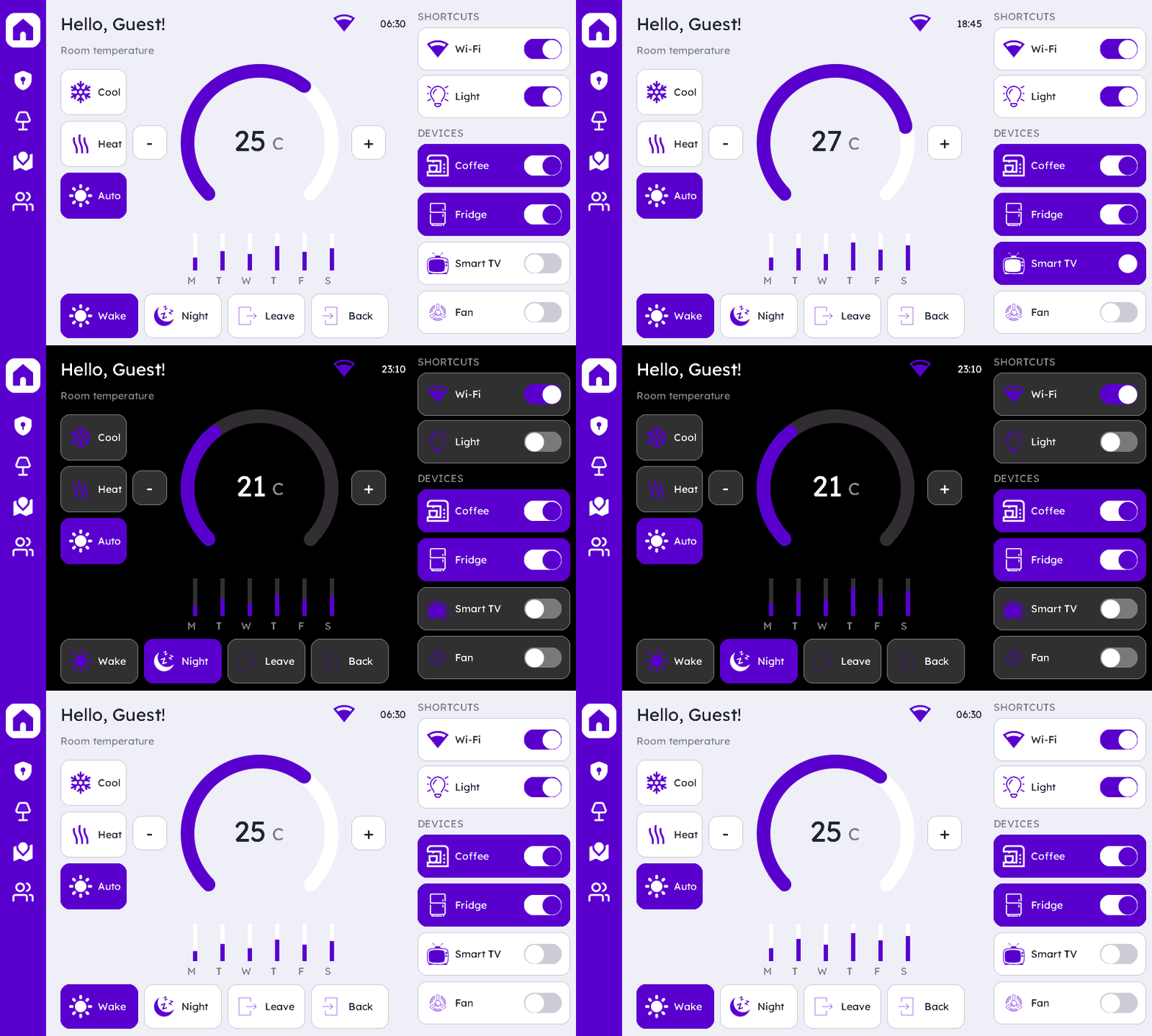
Built entirely from the runtime theme — no local colour
table anywhere in the file. Every widget takes its colours from the
UGUI_THEME_* roles, and the “Good night” scene re-skins all
~75 widgets to dark with one call.
 REAL C RENDER
The theme system, live
ugui_theme_set_accent(purple, dark) plus a screen rebuild
re-colours the entire panel. Colours are copied at *_init() time, so
re-theming is literally re-running init — and with zero-heap, caller-owned
widgets, that rebuild is trivially cheap.
An ARC as a thermostat
Rounded caps, an end dot, and the set-point stepping with the scripted day — 25° → 27° → a 21° night setback. Vertical LINGAUGE bars double as the weekly energy mini-chart.
18 SVGs, compiled in
Sidebar rail, mode chips, scene cards, shortcuts and device cards all use user-supplied SVGs compiled by the image pipeline into tintable icons that ship with the example.
Capacity is configuration
Cards restyle on state changes — the Smart TV card turns accent when it
switches on. A dense ~75-widget dashboard is just two flags:
-DUGUI_SCREEN_MAX_WIDGETS=96 -DUGUI_MAX_CHILDREN=40.
One C file. Any board.
The example files contain zero hardware code — no registers, no driver calls. Everything hardware lives in the Application Skeleton's HAL, so the exact files that recorded the animations above build unchanged for every target. Port the skeleton once and every example follows. The matrix below grows one board at a time.
CrowPanel ESP32‑S3 7.0″
800×480 RGB565 · GT911 capacitive touch. A complete PlatformIO project with μGui as a submodule and the large-panel examples included — clone, build, flash.
Get the firmwareYour PC — the Host package
Every release ships a Host target: drop an example file into its Application Skeleton and watch it render on your desk before the hardware even exists.
Open the Host packageSTM32
The same example files on an STM32 board with an RGB LCD — a new skeleton HAL, not a new UI. Same products, unchanged.
PIC32
And on a PIC32 HMI board — same story. Want your board covered sooner? Open an issue.
More on the way
The plan is a growing matrix — more examples, on more boards, at more display sizes. Next up:
The small-display set
New products designed for 320×240-class panels — the same “real product, one portable file” idea, distilled for small screens and lighter MCUs, again across multiple boards.
Settings hierarchy
Lists, toggles, spinboxes and message boxes with keypad-only navigation — the screens every shipping product needs eventually.
Today's examples, more boards
The patient monitor, cluster, coffee machine and smart home panel on STM32 and PIC32 hardware — new skeletons, identical UI files.
Beyond the showcases — the demo gallery
Every release also ships a demo application whose main menu fans out into per-widget demo screens: defaults first, then each feature added one step at a time. The pages in the widget catalog quote their code verbatim from these screens — what you read is exactly what rendered the frame next to it. Each widget family's demo screens can be compiled out with a single switch, which keeps the demo useful even on RAM-constrained targets.
Flash one today.
Clone, build, and every example is on your panel in minutes.
git clone --recurse-submodules https://github.com/mguidev/ugui_example_esp32_7_inch
cd ugui_example_esp32_7_inch
pio run -t upload